Spatial TME analysis
Spatial-PHLEX is the final submodule of TRACERx-PHLEX. It is a nextflow-based pipeline for the analysis of spatially resolved single cell data. It is designed for the highly granular phenotypic outputs of TYPEx, but owing to its simple input format can be used with any single cell coordinate data where single cells are assigned a phenotype or class label with minimal effort.
Workflow options
- Spatial-PHLEX provides three primary workflow options for spatial cell data:
Workflow 1: Spatial clustering
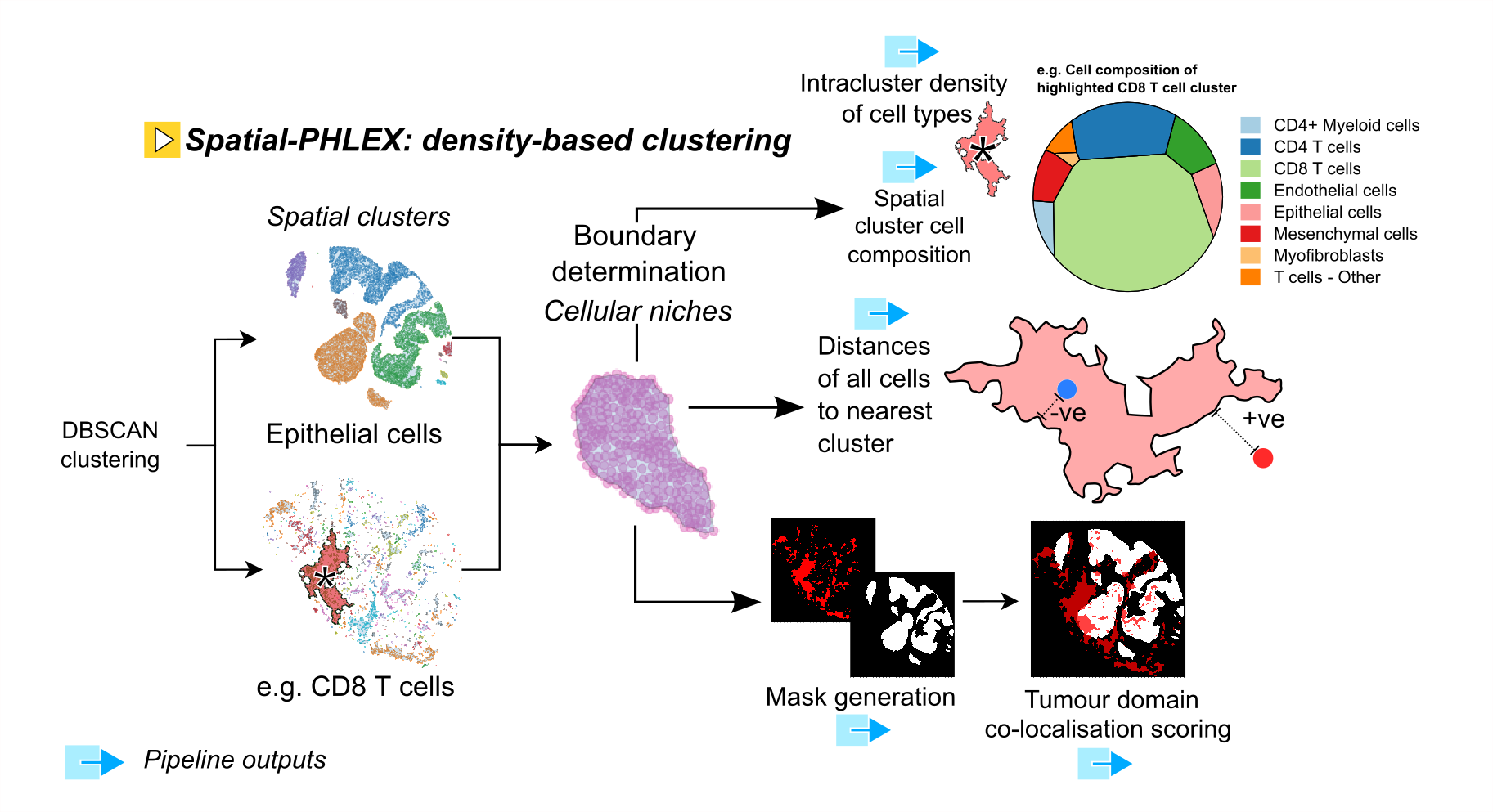
Overview of the Spatial-PHLEX spatial clustering workflow.
Workflow 2: Cellular barrier scoring
Definition of a barrier
Workflow 3: Barrier scoring to spatial clusters
Example usage
## Spatial-PHLEX
nextflow run ./main.nf \
     --metadata <path/to/metadata>\
     --metadata_delimiter '\t'\
     --objects '/path/to/cellobjects.csv'\
     --objects_delimiter '\t'\
     --phenotyping_column 'majorType' \
     --graph_type 'nearest_neighbour' \
     --outdir '../../results' \
     --release 'PHLEX_test' \
     --workflow_name 'clustered_barrier' \
Input Files
Required Inputs
- cell_objects.csv
A plaintext, delimited file containing single cell-level coordinate data for a set of images, plus their phenotypic identities.
- metadata.csv
A plaintext, delimited file containing metadata information about the images in cell_objects.csv. To run the pipeline this file must contain, for each image, an image identifier (‘imagename’), and the width and height in pixels for every image as columns with the header ‘image_width’ and ‘image_height’.
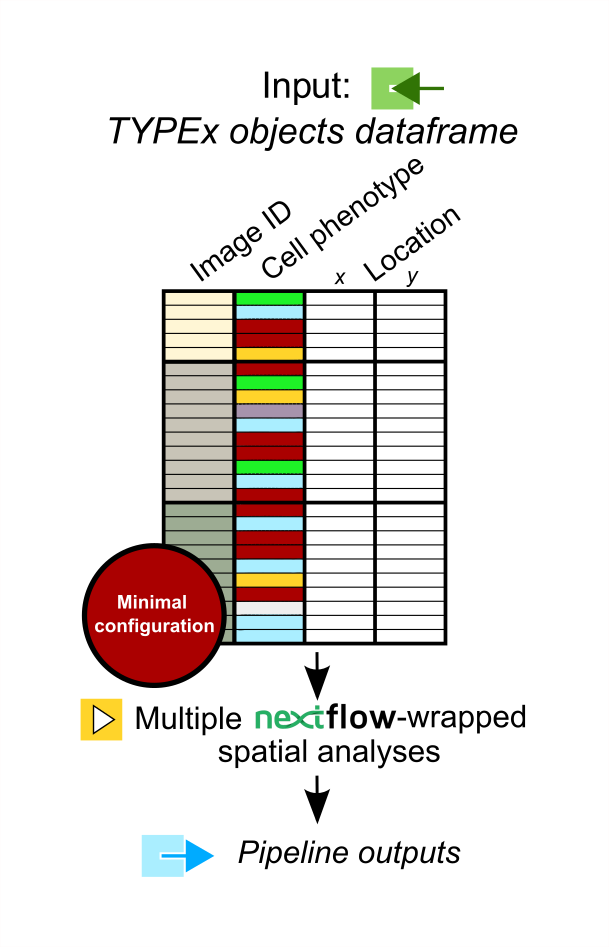
The Spatial PHLEX input dataframe has a simple format allowing cell coordinate results from other imaging modalities to be processed with Spatial-PHLEX.
Outputs
Cell type specific spatial clusters
Barrier scores
Output from Spatial-PHLEX has the following directory structure.
results
├── graph
│   ├── aggregated_barrier_scoring
│   └── raw_barrier_scoring
└── spatial_clustering
Note
The name of the raw_barrier_scoring directory will vary depending on which Spatial-PHLEX workflow is specified.
Parameters
Spatial PHLEX parameters are defined in the nextflow.config file in the Spatial PHLEX base directory.
Spatial-PHLEX param |
Definition |
Input options |
|---|---|---|
barrier_cell_type |
The type of cell forming the barrier in the barrier scoring calculation. |
Myofibroblasts |
barrier_phenotyping_level |
Column name in the objects table used to derive cell types for barrier scoring. |
e.g. cellType |
barrier_source_cell_type |
The source cell type to compute barrier scores for. |
CD8 T cells |
barrier_target_cell_type |
The target cell type to compute barrier scores for. |
Epithelial cells_tumour |
dev |
Development mode; sample a subset of input images. |
true, false |
graph_type |
The method of graph construction from cell positional data. |
‘nearest_neighbour’,’neighbourhood’,’spatial_neighbours’ |
metadata |
Path to the metadata file containing image-level metadata about images to be analysed. |
e.g. ‘/path/to/metadata.txt’ |
metadata_delimiter |
Delimiter of the metadata file. |
e.g. ‘t’ |
n_neighbours |
Number of nearest neighbours for nearest_neighbour graph construction. |
10 |
neighborhood_input |
globbable path to csv files containing neighbouRhood output produce by CellProfiler module. |
e.g. ‘/path/to/results/segmentation///neighbourhood.csv’ |
neighbourhood_module_no |
Module number of the neighbouRhood proces sin the CellProfiler pipeline |
e.g. 865 |
number_of_inputs |
Number of images to process the data for in development mode. |
2 |
objects |
Path to the cell objects dataframe. |
e.g. ‘/path/to/objects.csv’ |
objects_delimiter |
Character delimiting the objects dataframe. |
e.g. ‘t’ |
outdir |
Root output directory where results will be created. |
../../results |
overwrite |
Overwrite results published to the results directory, if they already exist. |
true |
phenotyping_level |
The column name in the objects dataframe defining the phenotypes of the cells. |
e.g. ‘cellType’; ‘Ki-67+ve’ |
publish_dir_mode |
Way Nextflow generates output in the publish directory. |
default: ‘copy’ |
release |
Release directory. Identifier for the data analysis run. |
e.g. ‘2022-08-23’ |
workflow_name |
Spatial PHLEX workflow to run on the data. |
Options: ‘default’,’spatial_clustering’, ‘graph_barrier’ |
Troubleshooting
Cell type niche analysis via density-based spatial clustering
Some information.
Cellular barrier scoring
Some more information.